Archive

Tag Archives: travel

I’m often asked by people who have just purchased a new iPhone or iPad what apps they should get for their new device. Right now this is what I’m recommending:

  • Kindle & iBooks – The Kindle and iBooks readers are the only apps you’ll probably need for reading books, and PDF files that people email to you. Both Do are excellent eBook readers, but books typically cost less in the Kindle store. On the other hand, I’ve found it much easier to get PDF files into the iBooks reader, so you’ll want to have both installed on your device. Don’t waste your time on the Kobo reader.
  • Zite & Flipboard - Zite is a free personalized magazine for your iPad that automatically learns what you like and gets smarter every time you use it. Flipboard on the other hand had a little bit slicker interface than Zite, but it does not learn your likes and dislikes as you read over time, but stick with the sites and categories you’ve chosen to read. I’d try both out to see which you like better.
  • Facebook & Path - Almost everyone is on Facebook now, and if you are, you should install the Facebook app. The user experience using the app is much more responsive and polished than the mobile web browser interface. You might also want to try out Path. Path allows you to post through to Facebook if you choose, or limit your posts to other Path users.  If you try it, I suspect you’ll like it.
  • Evernote - An excellent tool for capturing, syncing data between your desktop and cell phone. I love the ability it gives me to take a picture of a white board, and then later do a key word search on the text that Evernote has OCR’ed for me. I like to call it my “external brain”.

Read More

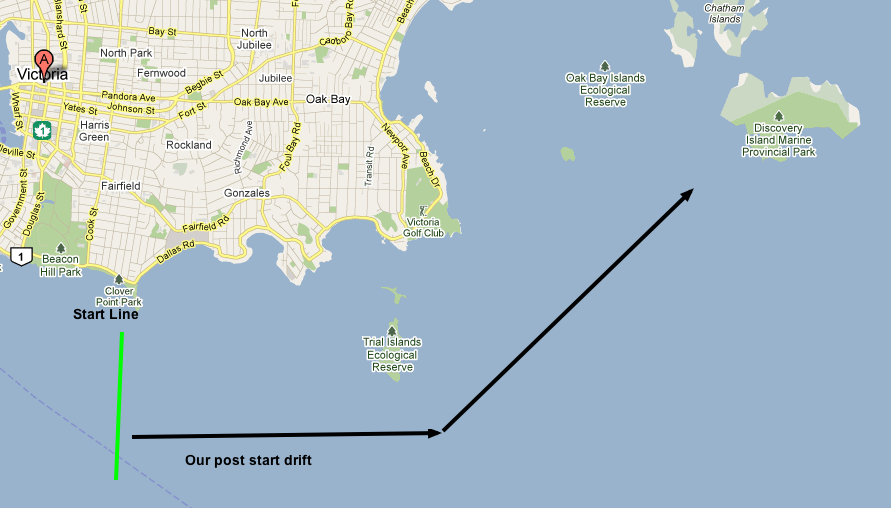
This is one use for my iPad that I definitely did not for see when I purchased it last year: Navigating my sailboat with it!  Compared to using a paper map, navigating with my iPad is a joy. I still take a paper map with me of course, just in case, but my iPad is my navigation tool of choice.  Last week I participated in the Swiftsure Race, which typically take about 16 hours to complete. This year because of light winds and adverse currents we crossed the finish line almost 30 hours after we started.

I had my iPad running the Navionics charting software the whole time, and I was able to keep track of where we were for the whole race on a single charge.  I turned the screen on and off as needed, but was still amazed at the battery life I saw during the race. The only problems I had with Navionics is that the program rebooted spontaneously three times during the voyage. I was able to quickly restart the program, but it typically “lost” some of the route that it had been tracking for me.

The water off Victoria where I sail as part of the Oak Bay Sailing Club, is very interesting and challenging (here is a day sail route from May 2011). Sometimes it can be difficult figuring out where you are given all the little islands and navigation buoys, but Navionics makes it much less stressful to navigate. There is also an iPhone version that I purchased. It works well, but the iPad’s larger screen is much nicer to view, and the battery life on the iPad is much better. I also purchased a water proof case to keep my iPad nice and dry.

If you want to use mapping software for sailing or driving, make sure you get the “3G” version of the iPad, as the wi-fi iPad does not come with a built in GPS. The price difference is about $100 between the two devices, but it is well worth the extra money if you end up using your iPad for navigation. The US & Canada version of Navionics for the iPad costs $50.

Pros: Easy to use. Relatively inexpensive. Excellent battery life. Great for day sails or longer cruises.

Cons: Software sometimes reboots after several hours of use. This is not a saftey concern, but did cause me to loose parts of the track from the 30 hour race I was in.

For me Swiftsure began on the week before as I scrambled to get all the gear together for the race. A life jacket with a harness, a tether, as well as a water activated light attached to my life jacket. Lots of little things which all make lots of sense, but were unexpected when I excitedly signed up for the race the month before. With all my gear in my duffel bag, I boarded Big Ben the night before the race to avoid Tour de Victoria road closures that would make it difficult to get to the boat on time in the morning.  Captain Jim McLaughlin (of the Oak Bay Sailing School)and most of the other 6 members slept on board the 50’ Benetau Oceanis that night.

Everyone was up by 7am, and after a light breakfast we had a brief discussion about how we would start the race, and who would be responsible for which tasks. Jim II was charged with setting up a Helm and Navigation rotation for our crew of 8: one hour on navigation, followed by one hour on the helm.  This meant that everyone would be able to get some sleep during the night if the race went long.  With a forecast of winds of 10-20 knots, there was some talk of getting home for a late dinner that night, but when we motored out of the Victoria harbour at 8:30am, winds were light and stayed light as we arrived at the start line just off Clover Point.

Read More

IBooksSomeone asked with a new iPad asked me today for my top 5 iPad apps. I had a hard time limiting it to 5, so below are my top 7 iPad apps.  There are a few apps that I love and use all the time on my iPhone, that I do not use on my iPad. This is typically because the website experience on the iPad is just as good or better than the iPad app. For example, I do not miss the Facebook app on my iPad, because the website experience is just fine on the iPad, as opposed to the sub par Facebook website experience on my iPhone. 

That said, here are my current crop of favourite iPad apps:

  1. Kindle Reader (free) – Amazon’s eBook reader has the biggest selection of current books at the moment. I have read close to 10 books on my iPad and love it as an eBook reader. I appreciate the ability to re-size the font size, look-up words instantly with it’s built in dictionary, and sync my furthest read location to my iPhone.  That said, there are a number of books that I cannot buy in digital format (are you listening W.W. Norton & Co, publisher of Patrick O’Brian’s Aubrey/Maturin novels?).
  2. Flipboard (free) – “A personalized social magazine.”  It is the easiest and most user friendly way to browse your twitter feed (if you have one), or browse the online version of the Economist magazine for example.  In addition you can see the twitter comments that people have made about the articles.  This is a difficult app to explain, but once you’ve used it you’ll love it.
  3. Air Video ($2.99) – If you already have a video on your desktop computer, but you don’t want to have to spend the time and effort into converting it into an iPad friendly format, Air Video allows you to simultaneously trans-code and stream the video to your iPad or iPhone over your wifi network.  This works wonderfully when you’re at home, but will not work when you’re on the road.  Even so, Air Video is a app I use on a weekly basis.
  4. Read It Later (free) – Similar to Instapaper ($4.99), Read It Later allows you to bookmark articles that you’d like to read later while browsing news on your PC, Mac, iPad or iPhone, and then download those articles to read later on your iPad or iPhone. In the case of the iPhone, it re-formats the article so that it can be easily read on a small screen.
  5. Kayak (free) – If you’re looking to travel, Kayak is a great tool to see what flights are available at what price.  It’s hard to explain how pleasant the software is to use.  I’ve found myself using Kayak at times even when I’m not traveling just to see how much it would cost to travel to Brazil, “just in case” I was able to go. In this case the iPad software is much nicer to use than the Kayak website. Even if you don’t end up purchasing your ticket through Kayak, it’s a nice place to start your travel plans.
  6. Navionics Marine: Costal B.C. ($29.99) – If you are a sailer or boater with an iPad 3G or iPhone, Navionics Marine software is a must buy! The iPhone version of this charting application costs only $9.99, and it is well worth the money.  I wish I had the 3G version of the iPad with it’s built in GPS hardware so I could use this software on my iPad as well as my iPhone. Not only does the software track your cruises, but gives you access to tide and current information.  Once your done on the water, you can upload your cruise track to Facebook.
  7. iBook (free) – Apple’s ebook reader is very similar to the Kindle software, except that the book selection for purchase is much smaller, but you do have the ability to view PDF documents and ePub books in iBook.  I use both the Kindle Reader and iBook depending on what I’m reading.
  8. Adobe Ideas (free) – Want to draw a quick sketch or doodle? Adobe Ideas is the app for you.  Even if you can’t draw, you can always import a picture, and then trace it before exporting the drawing.  Fun and functional.
  9. The Economist (free) – I love reading the economist, but having it on my iPad makes it much easier and convenient to read. It also allows me to listen to the stories if I don’t feel like reading them.

What are you favourite iPad apps?

Here’s a link to the outline of the Mobile Computing Discussion I’m leading today at the UVic Libraries.  Once I’ve cleaned up the notes, I’ll post them below:

Reading List for Mobile Computing and the iPad Discussion:

Read More

Want to make your own map with custom pins showing important locations (important to you in any case). How about custom directions? Look no further than Google’s “My Maps”. All you need is a Google account, and then surf on over to Google Maps, and click on to “My Maps” (you’ll be prompted to sign on if you are not already).

You can just have fun playing around with the maps, or possibly do something more useful:

  • You can send people directions to a party or event.
  • Give conference attendees directions to hotels, restaurants, or other places of interest.
  • Want to create a Sight seeing tour? Now’s your chance.
  • Plot Crime rate statistics.
  • Identify Neighborhood watch homes.
  • Paper Route delivery (or non-delivery) map.
  • Cool photo album, with pins put in where the pictures were taken.

Some of the features that could come in handy depending how how you want to use the system:

  • Maps can be made public or private.
  • You can draw lines on the map (sometimes the routes it suggests, just aren’t right!).
  • You can embed pictures or videos in the pop-outs from pins.
  • Email your maps to friends.
  • Embed maps in a web page.

Lastly, here is a map of my neighborhood in Victoria, BC., complete with all the important locations to our family. Enjoy!

I’ve been back from Serbia for just over a month now, and I in talking to people about my experiences there, I find myself repeating a few things over and over to people. First, it seems ironic that there is a perception in the media (true or not) that the US and Europe aren’t getting along well very, but the US currently spending large amounts of money to help Serbia integrate better with the EU. In the case of the project I worked on, they are trying to help the law schools incorporate more EU law into the curriculum so that they can be better positioned for entry into the EU somewhere down the road.

Another interesting thing I was told by one of my drivers, who also happens to be a bee keeper, is that right after the US bombing took place, the quality and quantity of the honey production by his bees increased dramatically. Now why would that happen? It may have something to do with the fact the the US destroyed most of Serbia’s heavy industry in the bombing, and in the process eliminated the source of most of the pollution in Serbia. Unfortunately (or fortunately depending on your perspective) many of the plants have now been repaired and the pollution if flowing freely again. It’s not surprising that Mirko (the bee keeper) now reports that honey production is down to where it was before the bombing again.

Lastly, during my stay in Serbia, the tenth anniversary of the Srebrenicia massacre was observed. Eight thousand men and boys were killed by Serbian soldiers while UN peace keepers looked on near the infamous Bosnian town. The Serbians I talked to in Belgrade were ashamed at what happened, but correctly pointed out that Bosnian soldiers had committed smaller atrocities in Serb villages around Srebrenicia before the Serbian solders committed their crimes. Prominent Bosnians and Croatians, including famous basketball players for example, rightly condemned what the Serbian soldiers did, and in their anger said many hateful things about Serbian people in general. There are now some signs of reconciliation though. An all star basketball game for the retiring Serbian basketball star and national hero Aleksandar Djordjevic was held during my visit. Many former team mates came to pay tribute, including some former Yugoslavia national team players from Bosnia and Croatia. It was reported in the media that one Croatian player expressed concerns about travelling to Serbia, because he literally feared for his life after some of the things he publicly said about Serbia during the war. Djordjevic told him not to worry, that he would let everyone know through the media that he was in Serbia as his personal guest. His visit went off without a hitch, and he was cheered by 20,000 Serbians at the beginning of the game. Hopefully we will see more cheering on both sides as time goes on.

National Library on the left.Today I conducted my last site visit at the Belgrade Municipal Court, and had the opportunity to visit with Biljana Kosanovic, the head of the IT department (or department of scientific information) at the Serbian National Library. The Municipal court visit went well, but was uneventful. The visit to the National Library was extremely interesting. Biljana comes across as an extremely capable individual who has managed to accomplish many things at the library in the face of severe staff and monetary shortages. Among other things, she manages Kobson, which is a consortia of academic libraries, and government organizations, organized to purchase scientific journals and academic databases. It was formed in 2001 and currently has 151 members. They created their own federated search at the title level, and are The IT staff at the National Library.evaluating DBwiz for in depth federated search (it is a small world after all). One obstacle for their adoption of DBwiz at their library is a current lack of linux or unix expertise in their IT department. They also include Serbian published journals in their index, and are in the process of harvesting 500 Serbian journals.

In her opinion, most students and faculty members at Serbian academic institutions do not know how to use on-line resources effectively. She was heartened to hear that the NCSC is helping the law faculties to offer legal research and writing courses. The library has a lab of 20 computers for instruction, and have used this lab to help medical faculty learn about on-line journals and databases for their research. IP authentication used to restrict access to the The reading room in the National Library.journals and databases, so that anyone coming from a Serbian government IP address can used the journals and databases (anyone at a university or government office). If using the service from home, students can use thePublic access terminals at the National Library.ir Library assigned user name and password to access resources through a proxy server (Easy Proxy). They are also looking at citation manager for possible use.

In the past the National Library had 12 librarians, but because of funding cutbacks they are now down to 3 librarians and 3 senior IT staff. This was a conscious decision made on their part, in the face of their cutbacks, to concentrate their management dollars on IT related positions, as in their calculation this would allow them to maximize the effectiveness of their institution in an increasingly digital world. The library has 206 other library staff, and 5 million monographs (or books for all non-library people out there).

Kobbis is their library automation system. It was developed in Slovenia, and was purchased by the government for all academic institutions on the country. Conversions are taking place at universities across the country to this new system. The migration is taking place slowly because of a general shortage of staff at all the universities. The Kobbis systems allows for a Union catalogue & OPAC for all involved.

Computer training lab at the National Library.One innovative way the National Library has found to combat staff shortages, has been for the head Librarian to request from the government young men who do not want to do their two years of national service in the military, to do that service in the library. They have requested technically minded (i.e. Computer literate) young men to work at the library, and it has been successful. The quality of work that the young men do is uneven, but overall it is very helpful. They do their best to hire the individuals that work out well, but are unfortunately not always successful.

The rest of the afternoon I spent working on a hardware and software purchase form for USAID, and worked on writing my final report. I’m coming down to the wire now, and hope to have the report substantially done before I get on the plane on Monday morning. I have a conference call with the purchasing specialist in Virginia tomorrow afternoon, so I’ll find out if the list of hardware and the specifications I’ve sent are acceptable for a purchasing perspective (for some reason USAID prefers to purchase from US Companies?).

After work I had dinner with the chief of mission, David Anderson. We went to a wonderful little Serbian restaurant. I ate a chicken dish, wrapped in bacon and filled with cheese. It tasted wonderful as you might have guessed, but was probably not the most healthy thing I could have eaten. Actually most of the Serbian dishes seem to score high in the taste department, but not so high if you’re looking for healthy food. Time to head to bed now.

The Belgrade Police Station.Today has been a report writing day from start to finish. I’ve been chasing down the last few requirements for my reports: A vend card system for student printing, windows training for law court judges and staff, and finally legal database access for Westlaw, Lexus/Nexus among others. Not much exciting to report.

On the side you can see a picture that I took on Monday of one of two police stations that the US bombed back in 1999.The amazing thing about the bombing of these buildings is that it appears that both buildings were hit directly in the middle (looking at them from the front), give or take a metre. I asked Mirko the other day if this way typical, or if they were just lucky. Mirko replied that almost everything they hit the hit right in the middle.

It’s 9PM here in Belgrade and I should probably get back to report writing…

Follow

Get every new post delivered to your Inbox.

%d bloggers like this: